Simplifying Daily Tasks for Employees
PeopleFirst
User Research | UX & UI Design | Design System


"Full details are restricted by NDA, but the core strategy and research are documented here"

How do you streamline the entire employee lifecycle into one intuitive platform?
The 340,000+ employees of Reliance used multiple platforms for their day-to-day self-service tasks which created fragmented administrative workflows. This ongoing project converged and simplified all processes from onboarding to separation, accelerating task completion and significantly reducing HR burden and Query volumes.
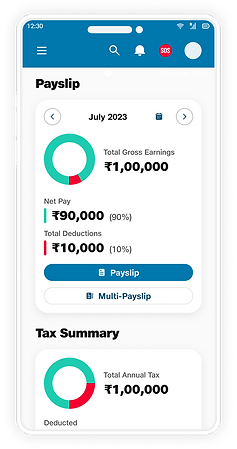
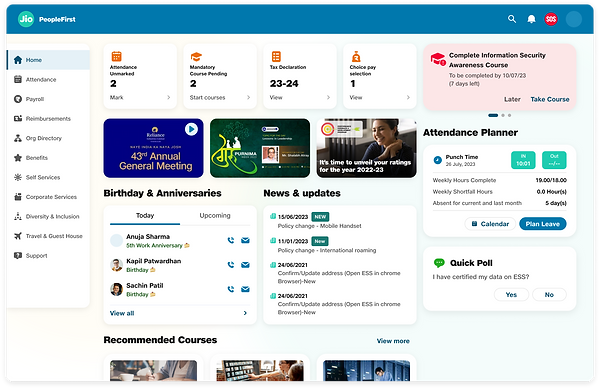
Home Page

-
Enhanced Design System
-
Layout optimised for better space utilisation
-
Quicker access to top actions, which are highlighted.
Key features of Redesign
Before
After
Application form Layouts

-
The components are upgraded and for better access and usability
-
Button sizes and positions changed for better guidance
-
Steps well defined, avoiding user confusion
Why the redesign works

1.
Context
Reliance Industries has a workforce of over
0.3 million and all the administrative and self-service works were fragmented between 2 online portals and an app.
Many services were split, information required by employees were not easy to find. So we set out to tackle the herculean task of Understanding, Streamlining and Simplifying Employee Services in to One single platform and corresponding mobile app

2.
Research
We spend 3 days understanding the system, and 2 weeks looking at surveys, conducting 25 user interviews and contextual inquiries, and a design workshop with multiple stakeholders.- HR, TA and Employees at multiple levels of the organisation.
What did the users say?
Employees
The system is so difficult to understand, I always end up needing help. Waiting for HR's replies makes the process so much longer!
I get 200+ queries a day, on top of the daily work I have. It does get annoying that people struggle with the simplest of tasks.
HR Partner
From the insights, we mapped out the overall workflow, created employee Journey map to easily understand pain-points of these users.

Critical
User Needs:
User Need
-
Better Design: Clear icons and labels so people can find their way around without guessing.
-
Help: Provide answers right where the user is struggling for quick and easy resolutions
-
Faster Actions: Upfront actionable entities like support links, quick CTA’s, upfront policy tab, etc, to minimise effort and time.
-
Clear Next Steps: Once a user finishes a task, give them a logical "What's next?" so they aren't left staring at a blank screen.
Suggestions
-
A well defined Design System
-
Clean Layout: Keep the screen simple and tidy so users don't feel information overload.
-
Custom Dashboard: Show users only the info that matters to them.
-
Self-Service Support: Use clear FAQs, policy guides, or even a chatbot giving users answers instantly to reduce queries to HR
3.
Defining
-
The Problem: The current platform is too complex and disorganized.
-
The Impact: HR is overwhelmed with basic questions; hiring and management are slow.
-
The Goal: A clean, organized, and automated platform that saves time for everyone.
"How might we design an intuitive employee platform that empowers users to find what they need instantly, reducing HR’s workload and streamlining the hiring journey?"
4.
Analysing
With the problem defined, we looked in to the Existing platform to further analyse why the problem exists and conducted Benchmarking to understand the market standards on how the problems can be solved.

Heuristics Analysis revealed multiple inconsistencies in components which called for a design system implementation.
Benchmarking recommendations included:
-
Company communication should be upfront
-
Quick Actions to be positioned at prime user attention hotspots
-
Robust Search functionality for quick and easy navigation
-
Information to be in grid layout for consistency
-
Smart white space usage for readability and to avoid content overload for users
-
Easy access to Support
5.
Design
We started with defining the Information Architecture.
The different modules where identified, understood and structured
100+
break the process into digestible, flexible phases to ensure steady progress.
modules meant we had to

Structuring
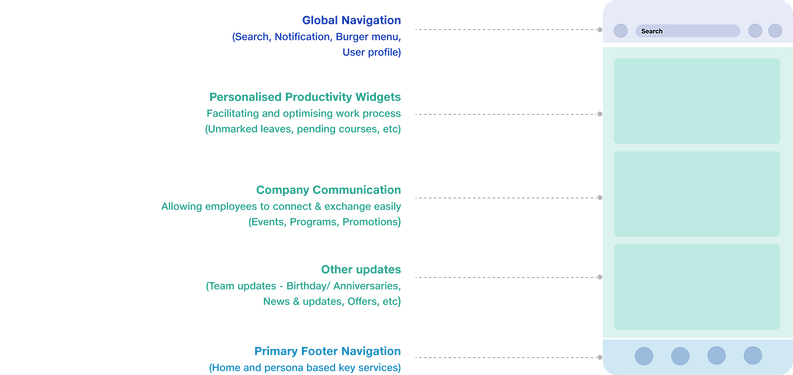
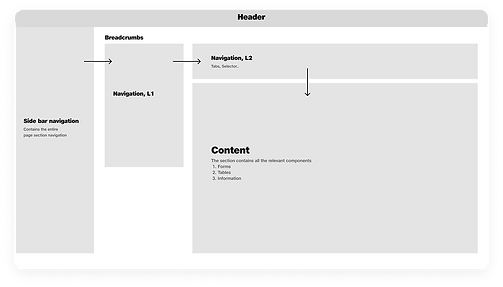
The Navigation Structure was defined, keeping flexibility and maximum discoverability, making even the most deeply nested content easily accessible.


JIO DS 2.0
Design System

We implemented our New design System , for consistent and aesthetic design